Uploading pictures on this site is now quite different than it was before. I may find something easier, but for now this is the process:
1. Go to the Write Post section.
2. After you type in your title and content as usual, place the cursor where you want the image to appear.
3. Go the Upload section just below the text area and click on the Browse button in the File line. Locate on your computer and select the image you want to upload. Type in a Title and Description if you want.
4. Click on the Upload button found at the bottom right of this section.
5. Once it uploads, an icon will appear. Click on it once and various options will appear. Ordinarily you would click on the top option so it says “Using original” instead of “Using Thumbnail.” Then click on the the third option, which is “Send to Editor.” This will place your picture in the text area where the cursor is located. Then click on “Close Options.”
6. When you are finished typing in everything you want to say in the text area, click on the Publish button below the text area as usual. Your text and image will be published in the blog.
You can also use this method to upoad documents, like Word documents or pdf documents.
If you have any questions or problems, please let me know.
Gary
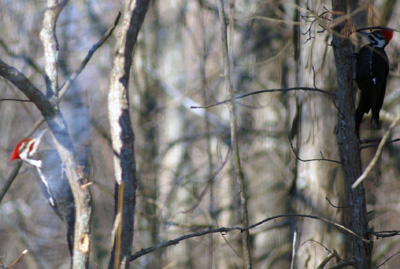
Two woodpeckers together in our yard. Taken through the window–you can see a glare.
There is a second way of inserting images, usually used when the image is at another place on the internet, although it can also be used for images on waldecker.net. If you pull it from somewhere else on the net, it has to be a place that isn’t password protected. Place the cursor in the text area where you want the image to appear. Then click on the Tree icon above the text area. Type in the web address path to the image (for example, begin with http:// and then add the address something like this: www.example.net/images/birds.jpg). The image of Chile below is not uploaded to waldecker.net. I have “pulled it in” from www.mtwsa.net/maps/chile2.jpg.

{ 0 comments… add one now }