To receive email notifications of comments, you need to do one of the following:
1. Be the author of the post. The author of a post automatically receives email notifications of comments to his or her post.
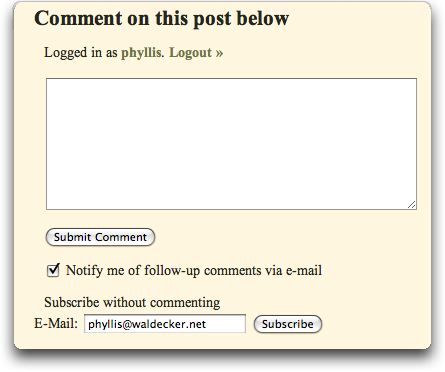
2. Check the box below the comment area that says “Notify me of follow-up comments via email” just before you make your own comment (see screenshot below).
3. Subscribe to a post without commenting. You can do this by typing in your email address in the box entitled “Subscribe without commenting.” Then click the corresponding Subscribe button (see screenshot below).
Here is some general information about email notifications of comments and of posts:
Receiving email notifications of new comments is not the same as receiving email notifications of new posts. Just to make sure everyone understands the difference between these two, what I am writing now is a post. Posts have titles. If you respond to this post, that is called a comment. Notifications for these two–posts and comments– are controlled by two different mechanisms, so one might be working for you while the other might not be. When they stop working it’s usually because I’ve upgraded one of the notification mechanisms to a newer version.
If you are subscribed to receive the comments of a given post, you will find a link that will allow you to manage some aspects of your subscriptions. The link looks like this:
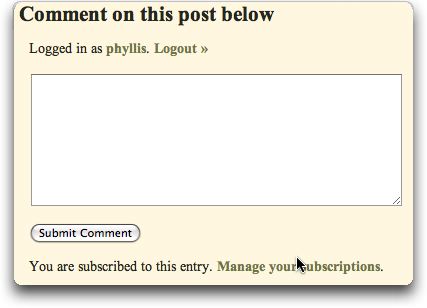
If you click on the Manage your subscriptions link you will see what you can do.
{ 8 comments… read them below or add one }
This seems like its different than before. At one time I thought I would receive all the comments if I made a comment myself.
I always forget to check the box.
I’m not sure, but I think once you click the box and make a comment in one post, it will by default be checked in future posts.
I think my problem was I checked the box after I submitted my comment…would that not work?
I received the test post e-mail, but there was no post.
Sorry, Nathan, I deleted the post after having received quite a few responses. It looked like it was working.
Janie, right, you’ve got to check the box before you submit the comment. But if you forget, you should be able to subscribe using the third method. If you look below the comment box, there will be a note indicating you are subscribed, or it will give you the opportunity to subscribe.
If you make a comment on a given post, you should receive all subsequent comments on that post. But you need to check the box first. I think you’re right, Janice. It used to be different. I think they made the change because on some large and public blogs, people don’t want to receive all 10,476 comments to a given post, but they do want to make a comment themselves.